


Works great. I wish it had the right-side USB port for a mouse, is all.


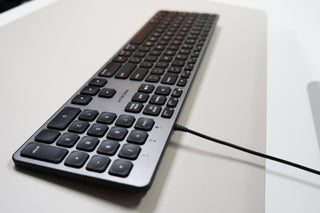
Type in total darkness without missing a beat — this backlit wired keyboard puts every Mac shortcut at your fingertips, lit up and ready to go.
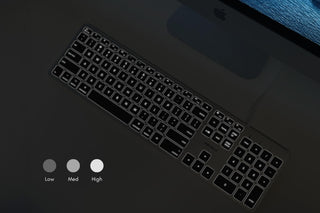
✅ Adjustable white backlighting — see every key clearly in dim rooms or late-night sessions
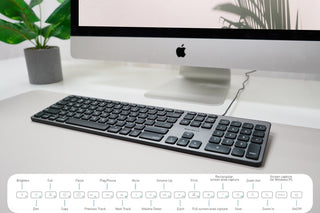
✅ Full Mac layout with 13 shortcut keys — volume, brightness, Mission Control, one touch
✅ USB wired — zero batteries, zero latency, zero connection drops, ever
✅ Low-profile scissor keys — quiet, responsive, built to last
Trusted by Apple users for over 30 years — designed in California.
⭐ "Backlight is gorgeous — keys are quiet and responsive, feels premium for the price" — Verified Buyer
BACKLIT KEYS
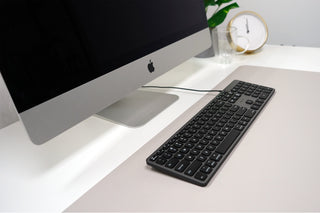
FULL-SIZE DESIGN
NO DRIVERS NEEDED
MAC-SPECIFIC LAYOUT
DESIGNED FOR APPLE ECOSYSTEM
Overall rating: 4.7 / 5 from 182 reviews.
Works great. I wish it had the right-side USB port for a mouse, is all.

Perfect keyboard for the production system. It allows me to work without worrying about losing a wireless connection.

Very silent keyboard. Great keyboard for mac. Good quality, wired (I don't like Bluetooth anyway) almost no noise, light weight. All the shortcuts work.

A winner! I like wireless, but I also like wires. And I don't like charging everything all the time. I got enough with the iphones, the airpods, the ipad, etc. I love this keyboard, just bought a second one!The backlit function is great. Three levels plus off if wished. All the keys behave just like the Apple keyboard at half the price! Well built overall. Let's see how long it lasts now.The tactile feeling is great also. My only whine is that the caps lock doesn't light up with a green dot (like the Apple one) when locked. But it's there; you just have to look at the upper right, just above the numeric keypad, and there's a caps lock indicator light right there for you. Happy!

It’s a BIG WINNER! Coming from a history of Apple Magic Keyboards, the Macally Backlit Keyboard blows all of those away. Bluetooth is not all it’s cracked up to be, and I would regularly have problems with the Apple keyboards or other brands of keyboards with Bluetooth. But the Macally Backlit Keyboard is superb to those in many way. It is very comfortable to use, quick response from the keys and a good overall feel when typing. I appreciate the backlit keyboard and no batteries to manage. An excellent buy if you’re in the market for a new keyboard. I am so glad I bought it!

Looks and works great I love the feel of the keys (bounce back) feels solid. Well made. Nice and bright. The only thing is that the backlight turns on randomly at night? It might be a Mac setting…I haven’t looked too far into it.

Key fell off Day 3 - Macally replaced it with a new one Update: Macally replaced the unit with a new one it is super nice. I love it. That key probably got damaged in transit somehow.

Great Keyboard! Great keyboard with a great feel. I always thought Apple’s ultra slim keyboards were some of the best (NOT the butterfly hinge style keyboards - those are horrible), and these feel a lot like the ultra slim models. The backlighting is nice and has enough brightness control to satisfy most people’s preferences.My gripes: As a regular key-command / keyboard shortcut user, function buttons are lame, and having one on the far bottom left corner (where the control button used to take up that real estate), is taking some time to get used to.No additional USB. The Apple Ultraslim keyboards had USBs on both sides of the keyboard allowing your mouse / keyboard and Dongle/thumb drive to use only one USB port. That’s not the case here. Yes, I know that there is a model of this keyboard with additional IO, but the placement on that model is terrible and doesn’t allow for any type of desk peripheral or control surface to be placed in front of it.Outside of that, these keyboards are incredible.

An almost perfect keyboard... My Moshi Luna finally gave in. I really liked that keyboard. In looking for a replacement, I wanted to keep the following:- Low profile- Backlit- Full keyboard (number pad)- Media keysThis does all of that, but there are a couple quirks I find not only unnecessary but potentially frustrating. The first is the command/control keys on the bottom left. They packed in an extra fn key, stealing width from the modifier keys (Control, Option, Command) and Space bar keys. Additionally, on the right side of the spacebar, they changed what should be a fn key, to a "save" (floppy disk icon) button. How/why anybody would need that down there blows my mind. Additionally the Control key is oversized and between the two of them they steal precious realestate from the spacebar and other modifier keys.F13 is a handy "print" button, but I don't think I'll ever use that. F14 and F15 are screen capture buttons. IMO, they could have made F13 which is traditionally a "print screen" button, a screen capture button (only need one, and possibly could be augmented/modified with one of the command/control/option keys, and then F14 could be the save (floppy disk) button and F15 could be the print (document) button.Heck, I'd even lobby to ditch the fn key at the bottom since there is already one up above the arrow keys. How often are we really using a fn key down there anyway?Anyway, those are just my critiques. So far it's a pretty decent keyboard. A USB-C/A port would be nice for added convenience. The keyboard itself feels well built but it's also super light and twists a bit under light torque.

I really like it, I would buy it again. For the last couple of years I've been typing on a Logitech easy switch K811.Truly one of the best keyboards I have ever typed on, however I needed a hard wired keyboard for boot purposes.Booting with a Bluetooth keyboard and relying on modifier keys has been spotty at best in my experience, and hardly ever works for me.Quality wise the feel and look of this keyboard is very close to that of my Logitech.The key travel is pretty much the same as is the noise level to that of the Logitech.I also wanted the extended keyboard with a number pad, I considered the beautiful Logitech MX Keys, but as I said earlier I wanted a wired keyboard as I have a number of drives to boot from upon the initial start or restart of my Mac.It took me a few minutes to figure out the Fn lock key so I can use my function keys with a program called Spark... a function key reprogramming widget that has become a must use for me.I'm sure reading the manual would have cleared that up but like with most peripherals I just plug them in and poke at them to see what they can do lol.After a few minutes search on the Internet I figured it out, press the fn - esc keys simultaneously and the little green light above the padlock lights up indicating the lock was enabled (see image), after I figured this out I decided I love this keyboard!I would definitely buy this again!The only thing I would like the cable to be 10', but other than that 5 stars!Go for it!

Awyeah! It's plug and play! Fits well with my Mac Mini. Love it!

Looks awesome, great features for the price! I purchased this keyboard as a cheaper alternative to the increasingly popular Logitech MX Keys product. I like the space gray color, and preferred something wired to avoid having to charge it over and over.The keyboard looks awesome. I love the shape of the keys, and the fact that they are concave to fit the fingers well. I also love the LED backlight. The function buttons have been useful and I’ve no problems with duplicate characters or lag.I removed one star because the cable coming out of the keyboard feels like it might break where it attaches to the keyboard. Also because the typing sensation is a tad mushy. Not a deal breaker by any means, but would love a more responsive “click” feeling when hitting the keys. I have had to get used to typing on it a little bit.Overall this is an excellent keyboard for the price, packed full of great features for Mac users. If you’re looking for a cheaper option that had design qualities that mirror that of the popular Logitech MX keys…this is a fantastic option!

Great replacement for the standard Macally Keyboard Excellent backlit budget Mac Keyboard, the keys have good travel and spacing feel. The keyboard also sits at just about the perfect height for ergonomic typing. Coming from the standard Macally keyboard after 2 years of use, the star of this one is the backlighting. Also while this isn't Bluetooth that is fine because that means no charging or reliability issues. Excellent keyboard for the money would buy it again and recommend it.
Great sofar
Exactly as advertised. Very nice backlight, easy to use.
Good keyboard. Love the feel of keys.
I was surprised at how much more comfortable it is to type with the backlit keys and larger letters. I am a reporter and use the computer to generate copy so am using keyboard for several hours a day. Glad I found this item!!
Light touch and great backlight!
During the daytime I cannot see the letters on the keyboard Yes they are lit but you cannot read them I want to swap out my WHITE KEYBOARD WITH A BLACK KEYBOARD as the letters will most certainly show Will you allow the swap?? Sincerely Joel DErrico
easy to install; works with my desk set up and mac mini
Good touch and feel. Backlighting is a little brighter than expected, but is ok. Typing angle is good. Feels solid!
Easy to set up. This keyboard is ergonomically ideal.
Great product!
Great very happy
FULL keyboard with number pad. Works “good”, lasts “long time”. Happy camper, here. Oh BTW - nice tactile feel to keys.
Great quality works as it shoud
Great product. Works as described.
Better than the Logitech Backlit Keyboard it Replaced Very pleased with the ease of install, adjustability of the brightness, compact footprint. Price (and other reviews) were part of my purchase decision.
screenshot does not work the 2 screenshot buttons don't work for me, I went over reviews, I've tried holding control, fn, etc while using the f14 and f15 screenshots and nothing. super disappointed because I need to be able to screenshot for class.
Wonderful product The keyboard impresses with its excellent functionality and ease of use. Thanks to high-quality materials and an ergonomic design, it provides comfortable work for an extended period. Its reliable construction and cable connection ensure stability and speed of data transmission. An ideal choice for anyone who values quality and convenience in working with a computer.
Perfect I like the style, the backlit keys, the feel when typing. It’s great
fantastic keyboard backlight, sure keys, perfect angle on desk--what a great keyboard. will buy for all my machines.
I've owned ~25+ keyboards...by far the best I'm 78. Retired MD. Wrote code in late 60's. I've owned a slew of keyboards, in fact I have 6 right now. This 11 inch, backlit, macally, is by far the best. Love the feel of the keys, the ability to use it in low light.I just bought my 2nd, to use in another room. My only suggestion, take care if you move the keyboard a lot. My housekeeper, cleans my desk, and this briefly impacted connectivity.You really need to give this keyboard a try. bliminizkeysg. YOU WILL LOVE IT.
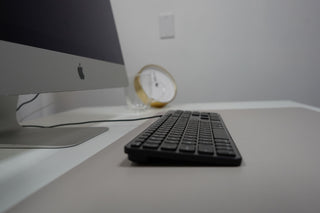
Lays almost perfectly flat If you like your keyboard raised in the back, this isn't the one for you. The feet on the back edge are only a fraction of an inch tall, so I keep trying to reach back and extend fold-out feet like my last keyboard had. But they're not there. Don't get me wrong, the keyboard has a great feel and the lighted letters help me to use it without the overhead light turned on. Good choice, high quality keyboard for the money.
Fantastic Keyboard For the past 30 years, I have been typing all day long. This is a very nice touch and feel keyboard. Couldn't be happier.I have zero cons to for this review.Thank you for making it a superb keyboard!!!
Bought corded version as backup Had to buy a corded version since the Bluetooth cloudless one was so glitchy and had issues burning through charges way too fast.
I Really Like It This keyboard replaces another aftermarket backlit Mac keyboard that was way too dim and did not light all the keys uniformly. This one really lights up all the keys as bright as you would want. The feel of the keys is OK, too. I really like this keyboard.
A competent and budget friendly keyboard for Mac. I have purchased this keyboard twice now, so I guess that means I like it haha. I had to buy a new one because I spilled a drink on my first one. If you're okay with a wired keyboard these are pretty nice. I like that it lights up and that is has pretty much every key. It has more keys than the default keyboard you will get with any Mac. You can customize the brightness as well. Overall, it's a pretty good keyboard with some modest bells and whistles and won't break the bank.
Great feel! Upgraded from a regular McAlly white keyboard from a few years ago. The keys on this one have much better action and the backlighting is great for working in the dark.
Exactly What I Wanted Great product, great price. Does what it is supposed to do. Lights up the keys for these old tired eyes.