


I love the keyboard though it’s taking a lot of getting used to. The only thing I don’t like is that I type a “B” with my right hand and it’s on the left side of this keyboard. I wish there were a way to fix that. Otherwise it’s great.


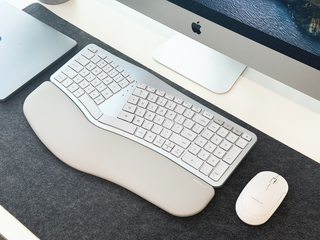
POSTURE-FRIENDLY DESIGN
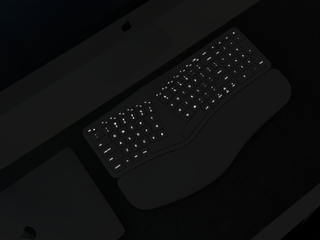
BACKLIT KEYS
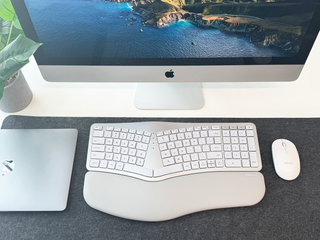
MULTI-DEVICE SYNCING
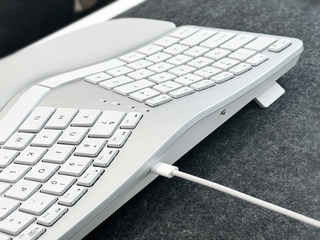
MACOS-OPTIMIZED LAYOUT

LONG-LASTING BATTERY
Overall rating: 4.1 / 5 from 102 reviews.
I love the keyboard though it’s taking a lot of getting used to. The only thing I don’t like is that I type a “B” with my right hand and it’s on the left side of this keyboard. I wish there were a way to fix that. Otherwise it’s great.

I love this keyboard. Pull it out of the box, read the instructions, very easy to set up and connect to my Mac within just a minute. It took me a few hours to acclimate to it and then it just clicked and I began typing just as fast as with my old Mac keyboard. It's very comfortable and my wrist are not fatigued are feeling a little bit of uncomfortableness like I did with my standard Mac keyboard. I like that keys do almost feel like the Mac keyboard, which is a feature I really liked.

This keyboard is a game changer for my office setup. It paired seamlessly to my Mac and two work PC’s without issue. It decluttered my desktop by reducing from 2 usb keyboards/ one wireless to just one wireless keyboard between the three. The tactile feeling of the keys is smooth and more raised than standard Mac key keyboards which is nice. The keyboard is very comfortable for my wrists and the pad under my wrists is a nice comfort touch. 10/10 recommend!

I purchased this keyboard for my home office setup and so far it's been great! I keep the backlight off to conserve battery, but it's nice to know it's there if I ever need it. The bluetooth set-up is straightforward, and I was able to get the keyboard fully charged during the process. The little cheat sheet table for shortcuts & function keys in the manual has helped me get familiar quickly. I'm so glad I decided to hold out for an ergo keyboard outfitted for mac integration - most of the special mac keys work (except the "fn/world icon" key that I use to pop up the emojis keyboard). I would recommend this, especially if you can catch it on sale!
Premium Wireless Ergonomic Keyboard for Mac Bluetooth Devices | Backlit

The Macally keyboard is perfect for me. The ergonomics allow me to be comfortable on a keyboard again. It connected seamlessly to my MacBook Air with Bluetooth and the numeric pad worked right off with no extra steps needed. It has taken a while to remember it needs a second or two to respond when it has been sitting unused but the extra battery life helped me make it a habit to hit the space bar to wake it up. Love it and would recommend to anyone needing an ergonomic keyboard for Apple devices.
Premium Wireless Ergonomic Keyboard for Mac Bluetooth Devices | Backlit

I am loving this keyboard! It goes perfectly with my minimalist set up. I love the white backlight and the color scheme of this stunning keyboard as well As someone who has recently started to develop carpal tunnel symptoms, I have been focused on making my spaces more ergonomic & this keyboard has helped tremendously!

I love this keyboard! After charging up for an evening and using it all day, it works great! It uses Bluetooth so I do not have to depend on my docking station. The keys are light touch, nearly the same as my windows ergo keyboard. So far battery life is good, and Bluetooth is easy to connect to and is working perfectly. 100% worth it for the $50 price.You can find more expensive and more ergonomic keyboards, but this one is great for an intro to ergo. It will likely just be my permanent keyboard since I am using a similar one for my windows system.

A worthy contender for an intro to ergo keyboard in a slightly smaller form factor I'll start by noting that this Macally ergo keyboard is a very attractive keyboard. It's a nice silver with white keys and a slightly grayish hand rest. I also appreciate the slightly contoured keys, they have a nice feel. It is the chiclet-style keyboard, so if that's not your thing be forewarned. It's also a slightly compact keyboard as compared to my other keyboard, a Logitech ERGO K860. It's more the size of the Microsoft Sculpt ergo keyboard which I used for years but finally ditched because I hated the detached keypad sliding off this way or that. I should clarify: it's the same size as the Sculpt without the Sculpt's detached keypad. Hmmm. Compromises were made, I'm afraid.What I like:1) I'm a Mac snob, so this is right up my alley. You windows plebs can go elsewhere.2) The price is right: it's about $80 less than the K860. EIGHTY DOLLARS. That's a bit. But you like Macs, so you don't care about paying extra for quality.3) For a chiclet, the key action good and the aforementioned contoured keys are nice. I found that I could type pretty quickly and adjusted to it without too much mitstypnig.4) It's pretty.5) Setup is a breeze. Just check the manual. They also included setup instructions on the back of the keyboard. Clever.6) Integrated chargeable battery (cable not included, it's a USB C).7) It has 4 little kickstands to adjust the height or angle to suit your needs.8) I'm typing on it right now. It works. It's not too bad. I almost like it... except...What I don't like:1) It feels like "ergo-light" in the that arc of the keyboard is rather weak. It's not as arc'd as the Sculpt (which had good arc) or the K860. So, maybe good if you're starting out, but I like more arc.2) The backlit keys aren't great as too much light escapes around the edges. At least the light is adjustable.3) The bluetooth connection LED is too bright. And red. Green is bright too. I finally settled on blue because it's the least bright. If you like working in a slightly darkish room at times, it can be distracting. Kinda like the microwave LED sitting right across from you in the bed in that budget motel you stayed in when you drove through Fresno last year. Does NOT need to be that bright.4) I ain't a "mini keyboard" kinda guy. I like that it has a full keypad, but sacrifices were made. Check out the mini-delete key. I need that key to be BIGGER.5) I've saved the worst for last. Yes, I'm looking at you, hateable mini-arrow key setup: I much prefer the full dedicated arrow pad. This arrow pad, besides having the mini up and down keys, also does double duty as a pgup/pgdn if you press the fn key. Blech. Now I get it, you may prefer the smaller form factor, and the inline arrow key rather than the inverted T may appeal to those of poor taste or low class. Cultured individuals prefer the inverted T. It's scientifically proven.All said, this is a perfectly acceptable keyboard, and the price is right. If you don't care about the crime-against-humanity inline arrow key setup, and the mini-delete key, and some other odd choices, you may find this perfectly suitable. All that said, I think it's a solid 4. Good price, quality key vibe, easy setup, meh key layout. I know over time you can adjust to just about any keyboard, but I think I'll personally stick to the full-sized (and quite expensive) K860. Cheers!
The keyboard has helped me tremendously with sore and achy wrists and fingers. I like that it is backlit so the keys are easier to see. I'd definitely purchase it again. I will recommend it to my friends and co-workers.
Wireless Ergonomic Split Keyboard for Mac - Bluetooth with Wrist Rest
The layout keys were not what I expected. I returned it.
Wireless Ergonomic Split Keyboard for Mac - Bluetooth with Wrist Rest
Finding the item I wanted and getting a great price were easy. Shipping was speedy and efficient, and the item was as described. It took a little bit of an adjustment to get used to using it, but now I love it! My hands are much happier now!
Wireless Ergonomic Split Keyboard for Mac - Bluetooth with Wrist Rest
I have recently switched to a MacBook for my work computer and was looking for a natural split keyboard that was not the Windows key layout. Being at my desk when not traveling I wanted to have a keyboard that mirrored the MacBook itself as I am a big user of keyboard shortcuts. Having to stop and think with my old Microsoft keyboard was a pain. Now it's no longer an issue. It paired up seamlessly and works without any issues. I would highly recommend it to anyone looking for a Mac style external keyboard to go with their Mac computer!
Wireless Ergonomic Split Keyboard for Mac - Bluetooth with Wrist Rest
I have had no real access since i have been travelng
Wireless Ergonomic Split Keyboard for Mac - Bluetooth with Wrist Rest
The back lighting does not shine through well Ana and it’s difficult to see the letters on the keyboard. Is there anything you can do to make the back lighting brighter?
Wireless Ergonomic Split Keyboard for Mac - Bluetooth with Wrist Rest
No excuse for keyboard bounce, that is a trivial engineering challenge to solve. I would not buy another product from you.
Wireless Ergonomic Split Keyboard for Mac - Bluetooth with Wrist Rest
It's a really great keyboard. If I could give two pieces of feedback, I'd ask for (1) there to be icons on the keys instead of just key names (this would make it easier when a page gives me a hotkey combo; I have to check my Mac for which keys I need to press based on their symbols, like Option, Command, Control, etc.), and (2) sometimes my Command button doesn't register (quite often I go to paste with CMD + V and it just types V instead of pasting from clipboard). Other than that, it's a really nice keyboard, and I'm very happy with it. Also my bird chewed the plus (+) key off the numpad; would love if you sold a silicone cover for the whole keyboard!
Wireless Ergonomic Split Keyboard for Mac - Bluetooth with Wrist Rest
I've owned this keyboard for some time, but only recently started using it regularly. I particularly appreciate how easily it switches between my two laptops. As someone who manages carpal tunnel issues, it has been exceptionally comfortable for extended daily use. I could not be happier with my purchase.
Wireless Ergonomic Split Keyboard for Mac - Bluetooth with Wrist Rest
It stopped working after 3 weeks and no longer maintains a charge
Wireless Ergonomic Split Keyboard for Mac - Bluetooth with Wrist Rest
So far so good.
Wireless Ergonomic Split Keyboard for Mac - Bluetooth with Wrist Rest
It does not solve the problem of wrist twisting and potential pinky finger pain. Typing B is a real issue. However, it attempts to solve the problem. Cannot use this keyboard without mouse (because you lose touch pad), I wish it includes the Mac touch pad as well. Again, returning the product is head ache, so careful before buying
Wireless Ergonomic Split Keyboard for Mac - Bluetooth with Wrist Rest
I really wanted to love this keyboard, but it's just too frustrating to keep charged and connected to my Mac stuff. None of my other peripherals have issues. The backlight was the selling point, but it basically means the keyboard is never fully charged. Needs more straightforward direct connection beyond Bluetooth. It randomly disconnects and I have to use another keyboard to even check Bluetooth. Been a customer for decades and generally love your Mac products, but this one has become useless for me.
Wireless Ergonomic Split Keyboard for Mac - Bluetooth with Wrist Rest
Very satisfied
Wireless Ergonomic Split Keyboard for Mac - Bluetooth with Wrist Rest
I wish it had separate keys for page up page down, etc. I also wish the printing on the keys was darker. In a well lit room sometimes it's hard to read the keys (which is sometimes necessary since the keys are in slightly different places than on my previous Microsoft keyboard (see not above about page down, etc.).
MY GREY MODEL IS VERY STYLISH AND THE KEYS ARE JUST THE RIGHT SIZE PLUS THE KEYBOARD DISTRIBUTION ANGLE IS PERFECT! I'M HAPPY TO BE TYPING WITH SOME SPEED AGAIN.
Periods “.” Show up randomly while I am using it. I have watched what I’m doing to see if I’m accidentally hitting the period key and I’m not.
Smooth and comfortable keys, exactly what I needed
Plug and play with Mac Mini M4. That is how Mac tech is supposed to work! Serious plus is the “silver esthetic”. I FINALLY have an ergonomic keyboard that looks like it belongs in my Mac world based office. I repeat….FINALLY!
A very comfortable keyboard that connected to my Mac very easily. The keyboard is great and fits my hands and arms very naturally. The packing was very good as were the instructions (super easy to connect!). Would recommend to anyone looking for a more natural fit for their hands and arms while working on a keyboard.
This keyboard has been okay. There’s a lot I like about it, but there’s one big issue I have that makes it hard to love. Nearly everything is great. It’s nice to have a backlit keyboard, the wireless works great, the 3 Bluetooth buttons make it really easy to switch workstations, which is all amazing, easy on/off switch on the back, and clear LEDs that show which Bluetooth connection you’re on, and if caps lock or Function lock is on. The small gripes I have are that the backlight LEDs are uneven, so it looks kind of cheap since all keys aren’t evenly lit. Incredibly minor detail. Also has kind of a short battery life, but again, not a huge issue. I usually just charge it when it lights up, and I’ve always got an extra port to plug it into. The big issue I have is it is VERY bad at either accidentally double inputting key presses, or ignoring them all together. I’m not sure what could be causing it, but it makes it near impossible to type and/or work quickly, because I’m constantly having to backspace and fix words it’s adding letters to, or double spacing where there shouldn’t be any. I know it’s not a me issue, because this didn’t happen once in ten years on my old Microsoft Surface ergonomic keyboard. If Macally can fix this one issue, 5-stars easily. The small gripes I have are basically non-issues, but that one problem makes this very difficult to use as a professional.
Great keyboard
Comfortable keyboard and work very well
First time I've used an economic keyboard in twenty five years. The fit and feel are great. It does wake up a little slow but as long as I tap the space bar a few seconds before I need it, it works perfectly. I'd buy it again for sure. Using it on a Mac mini if anyone is curious.
I loved the idea of a wireless backlit ergonomic keyboard for my mac. I bought this one, hook up was simple. 1 problem. It randomly double spaces when typing. As you can see from my review. I contacted support, they basically had me reconnect to blue tooth, then said I needed a new keyboard. They sent a new keyboard, same issue. I have had numerous other keyboards with this computer and never had an issue...only with this specific keyboard.
it takes time to get used to but it is definitely more comfortable to use than an flat keyboard..
Having a bit of trouble getting used to the hand placement so I hit the right keys. But still working on it, hopefully it will get better over time. I’ve looked at other keyboards and tried them, but they didn’t really work out so this seemed like my best option. But the jury is still out.
This may be the best keyboard I've ever used. I was used to a regular full sized keyboard, but this just took a couple of days to get used to and now I prefer it. It has an attractive appearance, it feels good to use, and it has a lot of great features. I like being able to charge over USB C, and the wireless connection to my MacBook is always strong. Really enjoying it.
The keyboard seemed to work well until all of a sudden my Mac started crashing. I isolated it to the Bluetooth keyboard connection. I’m trying to return the keyboard, but Macally hasn’t responded to my email. I’m disappointed in both the product and the customer service.
The space keys will frequently make two spaces rather than only one space.
.
Really nice! Looks great and the option to use wired or wirelessly is fantastic.