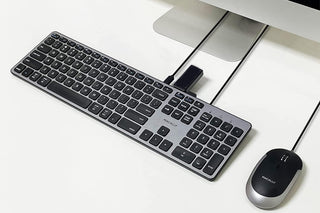
USB-C Keyboard for Mac with Built-In USB Hub Ports
SKU: UCZKEYHUBACSG
Regular price
$ 83.99
Unit price
/per
The USB-C keyboard that gives back more than it takes — built-in hub ports mean fewer dongles and a cleaner desk for your modern Mac.
✅ Built-in USB hub ports — plug your mouse and devices directly into the keyboard ✅ Native USB-C connector — designed for modern MacBooks, iMacs, and Mac minis ✅ Full Mac layout with 13 shortcut keys — volume, brightness, Mission Control at one touch ✅ Low-profile scissor keys — quiet, responsive, and comfortable for all-day typing
Trusted by Apple users for over 30 years — designed in California.
⭐ "Finally a USB-C keyboard with actual USB ports — no more dongles, no more hub clutter" — Verified Buyer
Quantity selected exceeds current stock
Secure Checkout
2 Year Warranty
30 Day Risk-Free
Free Shipping $49+
Adding product to your cart
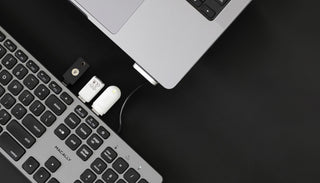
3 PORT USB HUB
CONNECT MORE, DO MORE
Expand your setup effortlessly. With 2 USB-A ports and 1 USB-C port, easily connect your mouse, flash drive, or webcam. No more dongles, just pure convenience.
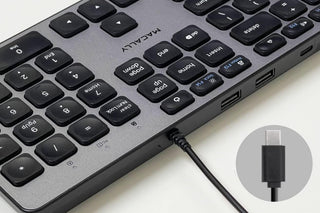
SIMPLE USB-C WIRED CONNECTION
PLUG AND PLAY PERFECTION
A hassle-free connection for the latest USB C devices. Whether you're using a next-gen MacBook or an iMac, our keyboard is ready to go out of the box.
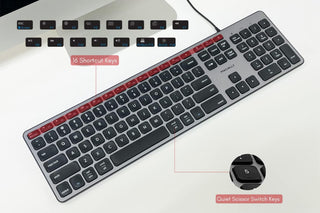
DESIGNED FOR MAC, PC COMPATIBLE
UNIVERSAL FUNCTIONALITY
All 107 keys and 16 shortcut keys work seamlessly across Mac, PC, and Chrome OS. Tackle any task, regardless of your operating system.
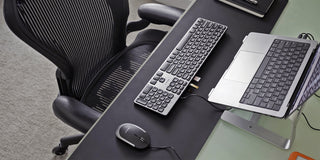
SLEEK APPLE-LIKE AESTHETICS
STYLE MEETS FUNCTION
Crafted for the modern workspace. With a low profile design, quiet scissor switches, and integrated typing angle, enjoy a blend of style and comfort.
DURABLE BUILD
BUILT TO LAST
Constructed with a rugged frame chassis, our keyboard is designed to withstand everyday use while maintaining its sleek look. Any issues? You're backed by a 2 year warranty and lifetime customer service support.
Customer Reviews
Customer Reviews
Overall rating: 4.6 / 5 from 46 reviews.
Disappointed I don't know the proper names for computer accessories but why would it come with a port connector that only fits my laptop which already has a keyboard? My desktop Mac needs a new one and the port connector is too small for it. Now I have to either return it (It took over a week to arrive) or purchase an adapter to make this small one work. Buying an adaptor will cause even more wires. Disappointed. The actual keyboard is perfect and I'm disappointed that I paid $70 and now have to buy a port thingie to use it. Why doesn't the computer keyboard come with both sizes so everyone can use it? Per the photo above my mini mac needs the large one.
Been working great It’s almost a year now since I got this and I’ve had no issues. It was pretty much plug and play. I didn’t have to configure or identify the keyboard. The buttons are cool to touch with a bit of the mechanical feel to it. I love that it has usbs and usb-c that works not just for mouse but also hard drives and more. I am loving it, no complaints.
Great keyboard for a Mac Mini UPDATE After a lot of use: Still a nice keyboard, BUT...backlighting would have made it PERFECT. Not. Being so dark, it is hard to see in low light. I have shopped keyboards now too much. Waiting for 1. backlit, 2. silver or white, 3. connects with USB C as this does, and also 4. Has ports on the back like this does - so there ya go - this one but with backlighting. I don't want wireless, and I don't want Bluetooth. Hassles with batteries and charging have gotten so old. :) Macally if you are listening...I like cords. I wanted this keyboard despite it's width because it has 3 USB ports on it and I love ports too. So the mouse is plugged into the keyboard, and the keyboard is plugged into the mini and I have two more ports, including a C port, on the keyboard. Very handy these days, when laptops are almost portless. Along with the Satechi multiport my Mini is now a go. AND this keyboard came in the same color as my Mini - the dark Space Gray. So - as far as a Mac Mini goes, this is ideal. Had it awhile now and am happy.
Feels amazing. Perfect weight, perfect feel This keyboard feels amazing. The keys are soft but durable, not too flat or plasticy. Has perfect weight to it unlike some of the name brand plastic keyboards that just feel cheap. Definitely satisfied with this.
Works well with my phone I use this with my phone's USB c port and it works good. I used the extra USB ports for my mouse and even a game controller and they worked well with my phone. If feels good to type with and looks nice.
Perfect aftermarket keyboard for PC desktop user with limited space. Macally Wired USB-C PC keyboard is a wonderful and stylish addition as an aftermarket keyboard to a PC system. I do not have a Mac so I cannot comment on other reviews that only address Mac users.This USB-C hard-wired keyboard has a decent heft to it which makes it an upgrade over bundled OEM keyboard components that have the plastic legs that swing-out. This keyboard has 4 (four) non-skid nubs permanently attached to the back of the keyboard for stability and comfort while typing, due to the slight angle on the keyboard body when laid on a flat surface.There are additional USB and USB-C inputs built into the top rim of the keyboard body. A lime-green function light system illuminates on the keyboard front face when plugged in and powered up, in addition to the number lock key function when selected.The keys have a nice feel to them when typing. The return on the key is very smooth. The keys lay flat enough that no extra keys are brushed against when moving fingers around the keyboard. The supplied USB-C cord hard-wired into the keyboard is of sufficient thickness that I would not worry about it being pulled out of place. It appears to be a well-designed encasement that I will monitor for wear over time.Five Stars out of Five. The keyboard is a welcome addition to my computer work area and I expect to get good long service out of this PC component. The overall design is tidy and has a near-luxury feel to it. This product was provided as a promotional item in advance of a user review.
Looks Good and Types Good I am a Mac user and am occasionally disappointed when trying a Windows/Mac-capable device. Not so with the Macally Wired USB C Keyboard with USB Port. Everything works as it should.I'm used to the flat key Mac keyboards so this one will take a few thousand words to be comfortable but so far I like it. Like the Mac keyboards, these keys have a short throw but are slightly stiffer.I like that the keyboard connects with USB C and provides 2 USB A ports and 1 USB C port. I never have enough. If your computer does not have a USB C port, this keyboard will not work. There are adapters that physically allow you to use a cable not natively supported but I don't think the adapter would work in this situation because the keyboard needs the speed and power supplied by USB C.Remember, this keyboard requires a USB C port on your computer.
Although I like this keyboard for the lighted keys, I would not buy it again.
Overall usability is good, but...
I get frustrated that the caps lock indicator light is located at the top right of the keyboard housing instead of being on the actual caps lock key or near it.
It does not provide a visual cue when the battery is getting low (I found that out the hard way!).
It does not show the battery level in the Apple control center like the Apple keyboard, Apple track pad, and my old Logitech MX keys all did. (Huge disappointment in that.)
The keyboard is good. Basically what I expected. I wish I could reassign the function key on the lower left by the option and command key but unfortunately you can't. I user (ctrl + option + command) + (another key) a lot as a keyboard shortcut for window layouts and application switching. Now I have to retrain my brain to skip the fn key.
I've been using the Macally iKey for decades (am on my second one) and I love both the large, old-school keys and the height and angle of it on my desk. Of course it's no longer made, so I chose this keyboard because I abhor Apple's slim, flat keyboards that are too small for my fingers and hands. I like the key size, but not the haptics. I also don't like the slim design and that it is too low to the desk surface for my comfort. I think the function keys are too close the to the number keys, so I'll likely hit those accidentally and then wonder what just happened when I hit the wrong key! I'm also not a fan of the lack of the Apple symbol on the Command key or the extra function key in the space bar row. As for the mouse, I can live with it, but it will take a while for me to get used to the right side button. I know it adds functionality, but in my decades of using Apple products (I still use their old wired mice) I've never needed a right button on a mouse.
I like the keyboard, there are just two things that I do not like.
My left hand is much more familiar with three big keys to the left of the spacebar. Having four thinner keys is not what I'm used to and didn't realize it when I ordered. I'm hoping that I can add opt to do the same as cmd/alt.
All of my USB-A flash drives will not eject after plugging into the keyboard itself, they are also in use for some reason.
Also, External self powered USB-A hard drives will not mount when plugged into the keyboard.
Keyboard is quality built and will withstand added smashing when my build fails. The extra USB ports on the keyboard eliminated a USB hub. Way better quality than I was expecting!
Not all host USB-C ports work Wonderful addition to a hosting computer with two USB-C ports. However, one USB-C port worked, the other did not. But, once crossing that hurdle, the keyboard worked like a charm. The ability to add two legacy USB-2/3 devices that would otherwise be unusable was great. Did not have to buy new peripherals to replace the already capable but older devices. While made in China, local network firewall protections on egress and ingress communications should mitigate any potential exploits (we hope).
It Is Good I like the keyboard but the keys do not feel great. They are more hard and a little stiffer than what I am used to, typically I use an Apple keyboard. Response time is a little slow too. All that though it is a nice keyboard at a third the price of Apple.
90% great keyboard. I bought one to use when traveling and bought a second one for my desk. It would deserve 5 stars but it types double letters on occasion. The previous keyboard I bought from Amazon typed double letters about half the time so this is an improvement. The keys feel solid and the integrated USB ports are helpful.
Great keyboard! The keyboard urned up quickly and works perfectly as described. I can also plug my N52TE gamepad into the USB slot and it works on my Mac laptop.
Nice soft touch keyboard with built-in USB-C Everything just works here. Warning though, if you use this for sysadmin work you'll want to plug into integrated USB (C-A preferably) as this won't be recognized at boot fast enough to fire bios commands.Markings are PC/Mac compatible, but that doesn't take long to get used to. Just need to find a mouse with a 1ft cord to plug into this!
USB-C Connection If you want a Keyboard with a USB-C hub - this is the one for you. The Keyboard itself it 'interesting' - you have to get used to the layout and the keys. It's OK - but the USB-C hub means it's so easy to plug in drives/devices right at the keyboard, which makes up for the actual use of the keyboard.
This keyboard has button repeat issues For the most part this keyboard feels good and works OK. The problem comes when it consistently will type out the same character multiple timess for one button press. This occurs regularly enough and it quite annoying when you are doing something like taking notes or typing messages to coworkers.
Amazing Keyboard I've tried several keyboards on a budget and this one is absolutely the best I've tried. Amazing product. 2 USB-A and 1 USB-C makes a big difference. Easy to type. I work from home (editing) and I'm very happy with it.
Love how it feels I really like this keyboard. Feels great typing and has huge variety of keys for gaming, drafting, anything type of computer work. Would recommend.
very satisfied This is a fine keyboard. I purchased this one in particular because it had connectivity for three USB-A devices connections, and there are no longer such keyboards available, except this one. Everything else has gone wirlesss these days, or uses USB-C. All my devices have been plugged into my old Apple keyboard which takes USB-A. This fine keyboard replaces my old Apple keyboard which developed flaws after many, many years.
High quality wired keyboard at a fair price I purchased this keyboard because my graphics work requires instant input and the Apple Magic keyboard with Bluetooth has a slight lag that causes problems. First impression of the Macally is a nicely designed product with good contrast and build quality. I didn't buy it for the connectivity but it now serves the role that my $100 USB-C hub served before. With USB-A and USB-C inputs I hardly use the hub anymore.My only disappointment has to do with the keyboard mechanisms. They are the preferred scissor mechanisms but they travel almost twice as far as the Apple keyboard so it takes awhile to get used to typing text. Just have to develop a new muscle memory.
Looks good, works fine no support This doesn't have support for your wrists when typing so it can get a bit sore. It is nice and sleek, love the connectivity and no downloading for it to work.
Perfect wired keyboard for my iPad I needed a wired keyboard for my AAC device which is on my iPad and with an adapter, this one is PERCECT! The size is good for my wrists. I am grateful it has additional USB ports. Though my iPad struggles to see the other devices attached to the keyboard because it only recognizes once device at a time since it's plugged in through an adapter using the lightning port.
Perfect for MacBook Pro 2021 16 inch. Have Macally keyboard plugged into a 24 inch LG Ultra Fine display. MacBook Pro plugged into LG display. Have Logitech usb A dongle plugged into Macally keyboard. All works great and flawless. Great desktop set up.
Great quality keyboard for mac I have been using this keyboard with apple computers without any issues. The keystrokes are great and I am impressed with the quality of the keyboard.
Super quiet and precise Great keyboard so far. I work 100% remote and love to use mechanical keyboards. Unfortunately, I have lots of meetings and am a multi-tasker. I often got "busted" because of my super loud mechanical keyboard (they could hear when I was typing away instead of "listening"). In comes this keyboard.This is not a "no noise" keyboard, but the keys are pretty quiet. Quiet enough where I now 100% multitask during meetings and no one calls me out. Big win!Overall, this keyboard works well with my macbook, my windows pc, and my linux machine as well. No drivers need installed on any OS. The keys are easily readable and I haven't seen any "missed" keys (I type 70- 80 words per min) since I first got the keyboard. As far as ergonomics go, the keyboard sits really flat and so I do have to use a wrist pad to make sure I don't hurt my wrist/hands.My only real complaint is with the number keypad. I don't like how they set up the "=" and "/" and "*" keys. These keys were put on the top row in the 2nd, 3rd, and last position. On all of the other keyboards I've ever used, those three keys have always been "/", "*", and "-" so I'm always screwing up spreadsheets because of this.Overall though - totally a keeper. I'd recommend for sure.
Great keyboard - mind the USB-C I'm a keyboard junkie, and I'm very picky about the keys on my keyboard. I love these scissor keys - they're just what they should be: short keystroke, firm, but not stiff, no wiggle, and really, just a pleasure to type on. The keyboard's fit and finish is really solid, and you can tell this isn't going to fall apart the first time it gets knocked around.My only issue is with the connectivity - it connects with a double-sized USB-C plug, which I’m not a huge fan of, just because not everything is rocking a USB-C port yet. You can solve this little issue by picking up a USB-C to USB-A converter, but you really shouldn’t have to. I think for the $70 price tag, that really should have been included.I hope this was helpful - it’s a solid keyboard, and it’s a Macally, so you know it’s built well. I’m just a little put off by the price and the lack of a USB-A adapter, but the performance is pretty great.
Perfect Third Party Mac Keyboard... I'm a long, long time Mac user and have owned quite a few third party keyboards for my various Apple computers. As long as you want a numeric pad and the size it adds, along with a wired only connection, this is a near perfect keyboard. The slim profile closely mirrors that of the genuine Apple keyboard and is excellent for fatigue free typing. It's worth noting that the wired connection is USB-C only, which means it won't directly connect to older Macs. However, an inexpensive adapter is readily available on Amazon that allowed it to work flawlessly with my 12 year old iMac. Works equally well with an 8 year old MacBook Pro and a 2021 Mac Mini.The large size and lack of wireless connection makes it a bit more cumbersome to use than a true Apple keyboard, but those elements are clearly defined in the ad so one knows what they're buying from the start. I prefer my Apple keyboard, but this MacAlly product works exceedingly well within its own lane.I trust this review has been helpful. Thank you for reading.